
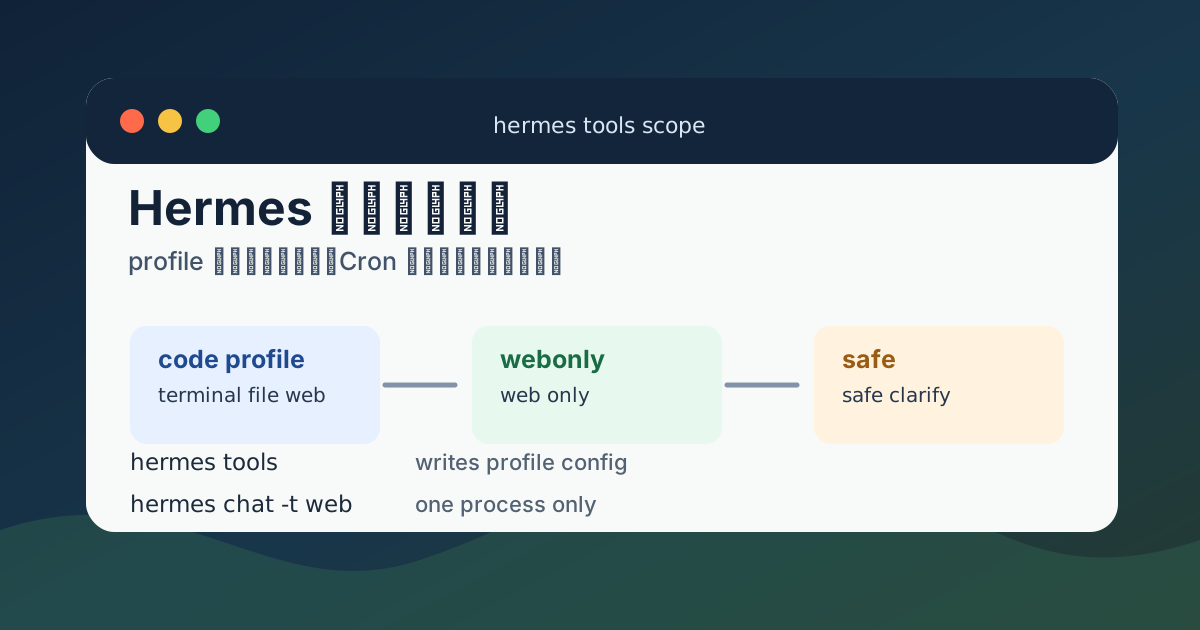
Hermes 里的工具权限不要随手全局改。特别是已经接了 Matrix、Telegram、Cron 或多个机器人时,hermes tools 改到哪里、影响谁、什么时候生效,这几个问题必须先分清。
一句话结论:
在某个 profile 里全局改
tools,会影响这个 profile 下的后续会话和同 profile 的机器人;用启动参数、Cron 配置或子任务参数限制工具,通常只影响那一次进程或那一个任务。
这篇按实操方式整理。读完后应该能判断:什么时候该改 profile,什么时候只临时加 -t web,什么时候应该新建 webonly / safe profile。
先分清四个层级
| 层级 | 常见写法 | 影响范围 | 是否长期保存 |
|---|---|---|---|
| profile 级 tools 配置 | hermes tools、hermes tools enable web、hermes tools disable terminal | 当前 profile 下的后续会话、gateway、Matrix、Telegram、reset 后新 session | 是 |
| 指定 profile 的 tools 配置 | hermes -p webonly tools disable terminal | webonly 这个 profile 下的后续会话和机器人 | 是 |
| 单次启动 toolsets | hermes chat -t web -q "查一下..." | 只影响这一次 Hermes 进程 | 否 |
| Cron / 子任务 toolsets | enabled_toolsets: ["web"]、toolsets: ["web"] | 只影响这个 cron job 或子 agent | 通常只保存在该任务配置里 |
如果你不确定自己正在改哪个 profile,先查:
hermes profile list
hermes config path
hermes config env-path
在 Matrix / Element 里也可以看当前会话状态:
//profile
//status
配置文件路径在哪里
默认 profile 通常在:
~/.hermes/config.yaml
~/.hermes/.env
具名 profile 例如 webonly 通常在:
~/.hermes/profiles/webonly/config.yaml
~/.hermes/profiles/webonly/.env
更稳妥的查法是用 Hermes 自己返回路径:
hermes config path
hermes config env-path
查看指定 profile 的配置路径:
hermes -p webonly config path
hermes -p webonly config env-path
修改前建议先备份:
CFG="$(hermes config path)"
cp "$CFG" "$CFG.bak.$(date +%Y%m%d-%H%M%S)"
指定 profile:
CFG="$(hermes -p webonly config path)"
cp "$CFG" "$CFG.bak.$(date +%Y%m%d-%H%M%S)"
不要直接把 .env 内容贴到群里或日志里,里面可能有 Matrix access token、Telegram bot token、OpenAI / Anthropic / OpenRouter API key。
1. Profile 级 tools 配置会影响同 profile 的机器人
如果你在 code profile 里运行:
hermes tools或者:
hermes tools enable web
hermes tools disable terminal
hermes tools disable file
这些改动通常会写进当前 profile 的配置里。只要 Matrix、Telegram、CLI、Cron 都用的是同一个 code profile,它们后续都会吃到这个工具范围。
影响对象包括:
- 同一个
codeprofile 的 CLI 会话; - 同一个
codeprofile 的 Matrix gateway; - 同一个
codeprofile 的 Telegram gateway; - 后续
//new、//reset后的新 session; - 使用这个 profile 新启动的 Hermes 进程。
所以,在私有运维机器人上关闭 terminal,可能会让 Matrix 机器人也不能跑命令;在群聊机器人上开启 terminal,也可能把高风险工具开放给这个 profile 下的其它入口。
查看当前工具:
hermes tools list进入交互式工具开关界面:
hermes tools开启 web:
hermes tools enable web关闭 terminal:
hermes tools disable terminal关闭 file:
hermes tools disable file如果这是接了 Matrix 的 gateway,改完后建议在 Element 里重置会话:
//reset必要时重启 gateway:
//restart或者在服务器上执行:
hermes gateway restart如果 gateway 是 systemd user 服务托管的,先确认服务名:
systemctl --user list-units 'hermes*' --no-pager再重启对应服务:
systemctl --user restart hermes-gateway.service服务名不一定完全相同,实际以 systemctl --user list-units 'hermes*' 输出为准。
2. 指定 profile 改 tools,只影响那个 profile
如果你已经创建了 webonly profile,就不要直接运行不带 -p 的命令。要写成:
hermes -p webonly tools list
hermes -p webonly tools
把 webonly 改成只适合公开群的低权限机器人:
hermes -p webonly tools enable web
hermes -p webonly tools disable terminal
hermes -p webonly tools disable file
hermes -p webonly tools disable browser
hermes -p webonly tools disable cronjob
hermes -p webonly tools disable messaging
这样改的是:
~/.hermes/profiles/webonly/config.yaml不会直接改默认 profile:
~/.hermes/config.yaml验证路径:
hermes -p webonly config path
hermes config path
如果两个路径不同,说明 profile 隔离是成立的。
3. 单次启动限制 toolsets,只影响那一个进程
有些时候只是临时查资料,不想改 profile 全局配置,可以用启动参数限制本次工具范围。
例如只给这次查询 web 工具:
hermes chat -t web -q "查一下 Debian 13 当前稳定版内核信息,给我摘要"这类写法的特点:
- 不改
config.yaml; - 不影响 Matrix / Telegram gateway;
- 不影响同 profile 的其它会话;
- 命令结束后限制也结束。
适合这类场景:
| 场景 | 推荐 |
|---|---|
| 临时联网查资料 | hermes chat -t web -q "..." |
| 临时只做普通问答 | 用低权限 toolset 启动一次 |
| 不想影响正在运行的 Matrix 机器人 | 用单次启动参数,不改 hermes tools |
如果你要确认这次没有改到配置,可以前后对比配置文件时间:
stat "$(hermes config path)"
hermes chat -t web -q "只回答:测试"
stat "$(hermes config path)"
如果 config.yaml 修改时间没有变化,说明这次限制没有写进 profile 配置。
4. Cron / 子任务限制,只影响那个任务
Cron job 或子 agent 通常可以在任务配置里单独限制工具。例如某个定时任务只允许联网查询,不允许文件和终端:
enabled_toolsets:
  - web
或者子任务委派时指定:
toolsets:
  - web
这种限制只应该影响那个 job 或那次 delegate task,不应该改 profile 全局 tools。
适合这类任务:
| 任务 | 建议工具 |
|---|---|
| 每天查新闻摘要 | web |
| 监控公开网页变化 | web |
| 让子 agent 总结资料 | web、safe |
| 自动改服务器配置 | 不建议给公开入口自动做 |
如果 Cron 是 Hermes 自己管理的,先查实际命令和配置格式:
hermes cron --help
hermes cron list
如果你不确定当前 Hermes 版本的字段名是不是 enabled_toolsets,不要硬写。先让 Hermes 输出已有 cron 配置,再按当前版本的真实格式修改。
5. 不同机器人最好用不同 profile
如果你想让 Matrix、Telegram、公开群、私人运维机器人拥有不同工具,最干净的做法是分 profile。
推荐拆法:
| profile | 用途 | 工具策略 |
|---|---|---|
code | 私人运维和写代码 | 保留 terminal、file、web |
webonly | 公开群或低权限问答 | 只开 web,关闭 terminal / file |
safe | 低风险聊天 | 只开 safe / clarify 一类低风险工具 |
matrixops | 私人 Matrix 运维机器人 | 可以开运维工具,但限制 allowed users / rooms |
创建 webonly:
hermes profile create webonly如果想从当前 profile 复制基础模型配置:
hermes profile create webonly --clone然后收窄工具:
hermes -p webonly tools enable web
hermes -p webonly tools disable terminal
hermes -p webonly tools disable file
hermes -p webonly tools disable browser
hermes -p webonly tools disable cronjob
hermes -p webonly tools disable messaging
创建 safe:
hermes profile create safe进入交互式工具界面,只留下低风险工具:
hermes -p safe tools如果当前版本支持直接 enable / disable 对应 toolset,也可以按实际名称设置:
hermes -p safe tools list以 tools list 输出为准,不要凭空猜工具名。
6. Matrix 机器人怎么套用 profile
Matrix gateway 如果要绑定到某个 profile,启动或服务命令里应该明确带 profile。
手动启动示例:
hermes -p webonly gateway start查看状态:
hermes -p webonly gateway status重启:
hermes -p webonly gateway restart如果使用 systemd user 服务,服务文件里也要明确 profile。先找到服务:
systemctl --user list-units 'hermes*' --no-pager
systemctl --user cat hermes-gateway.service
服务里的启动命令应该能看出用的是哪个 profile,例如:
ExecStart=/usr/bin/hermes -p webonly gateway start如果服务里没有 -p webonly,那很可能跑的是默认 profile。这个时候你在 webonly 里改工具,Matrix 机器人并不会吃到;你在默认 profile 里改工具,Matrix 机器人反而会被影响。
修改服务前先备份:
mkdir -p ~/.config/systemd/user/backup
cp ~/.config/systemd/user/hermes-gateway.service ~/.config/systemd/user/backup/hermes-gateway.service.$(date +%Y%m%d-%H%M%S)
修改后重载并重启:
systemctl --user daemon-reload
systemctl --user restart hermes-gateway.service
systemctl --user status hermes-gateway.service --no-pager
如果退出 SSH 后也要继续运行:
loginctl show-user "$USER" -p Linger
sudo loginctl enable-linger "$USER"
7. Telegram 机器人同理
Telegram gateway 也一样。关键不是平台名字,而是它使用哪个 profile。
查看指定 profile 的 gateway 状态:
hermes -p code gateway status
hermes -p webonly gateway status
如果 Telegram 和 Matrix 都共用 code profile,那么:
hermes -p code tools disable terminal会同时影响这个 profile 下的 Telegram 和 Matrix 后续会话。
如果希望 Telegram 私聊保留全功能、Matrix 群聊只保留 web,就拆成:
code      -> Telegram 私聊 / 私人运维
webonly   -> Matrix 公开群 / 低权限查询
分别配置:
hermes -p code tools list
hermes -p webonly tools list
不要让两个机器人共用同一个 token,也不要把群聊 bot 放到带高权限工具的 profile 里。
8. 生效规则:reset、restart 和新 session
工具配置不是所有情况下都会立刻改变当前对话。稳妥做法:
| 修改内容 | 建议动作 |
|---|---|
| 只改当前 CLI 启动参数 | 不需要 reset |
| 改 profile 级 tools | 新开 session,或在 Matrix 里 //reset |
| 改 gateway 相关配置 | //restart 或重启 systemd user 服务 |
| 改 systemd 服务文件 | systemctl --user daemon-reload 后重启服务 |
改 .env token / homeserver | 重启 gateway |
Element / Matrix 里常用:
//status
//profile
//reset
//restart
服务器上常用:
hermes -p webonly gateway status
hermes -p webonly gateway restart
systemctl --user status hermes-gateway.service --no-pager
9. 推荐实操:做一个只开 web 的 Matrix 群聊机器人
下面是一套相对保守的流程。
创建 profile:
hermes profile create webonly --clone确认路径:
hermes -p webonly config path
hermes -p webonly config env-path
备份配置:
CFG="$(hermes -p webonly config path)"
cp "$CFG" "$CFG.bak.$(date +%Y%m%d-%H%M%S)"
收窄工具:
hermes -p webonly tools enable web
hermes -p webonly tools disable terminal
hermes -p webonly tools disable file
hermes -p webonly tools disable browser
hermes -p webonly tools disable cronjob
hermes -p webonly tools disable messaging
检查工具列表:
hermes -p webonly tools list配置 Matrix 前先确认当前版本帮助:
hermes -p webonly gateway --help
hermes -p webonly config --help
启动 gateway:
hermes -p webonly gateway start如果已经用 systemd 管理,就确认服务是否带 -p webonly:
systemctl --user cat hermes-gateway.service最后在 Element 里检查:
//profile
//status
//reset
如果 //profile 显示的不是 webonly,说明 gateway 没跑在你以为的 profile 上,先修服务或启动命令,不要继续改工具。
10. 排错清单
改了工具但 Matrix 没变化
先看当前 Matrix 会话用哪个 profile:
//profile再看服务器上的服务命令:
systemctl --user cat hermes-gateway.service如果服务没有带 -p webonly,那它可能不是在跑 webonly。
然后重置会话:
//reset必要时重启 gateway:
//restart改错 profile 了
先查两个配置路径:
hermes config path
hermes -p webonly config path
如果刚才改错了默认 profile,可以用备份恢复:
cp ~/.hermes/config.yaml.bak.YYYYMMDD-HHMMSS ~/.hermes/config.yaml恢复后重启相关 gateway。
不知道工具名叫什么
不要猜,直接列:
hermes tools list
hermes -p webonly tools list
文章里的 terminal、file、web、browser、cronjob、messaging 是常见写法;如果你当前版本名字不同,以 tools list 输出为准。
不确定当前版本支持哪些参数
先看帮助:
hermes --help
hermes chat --help
hermes tools --help
hermes gateway --help
hermes cron --help
Hermes 版本更新后,字段名和命令参数可能会变。教程里的原则不变:先确认当前 profile 和配置路径,再决定改全局还是只改单次任务。
最后建议
私人运维机器人不要和公开群机器人共用 profile。
推荐长期结构:
code
  私人使用,能跑命令、能改文件、能联网查资料。

webonly
  公开群或低权限 Matrix,尽量只开 web/search。

safe
  低风险聊天,只保留安全工具。
日常判断只记这一句:
hermes tools是 profile 级长期配置;hermes chat -t web是单次进程限制;Cron / delegate task 里的 toolsets 是任务级限制;不同机器人最好用不同 profile 隔离。