
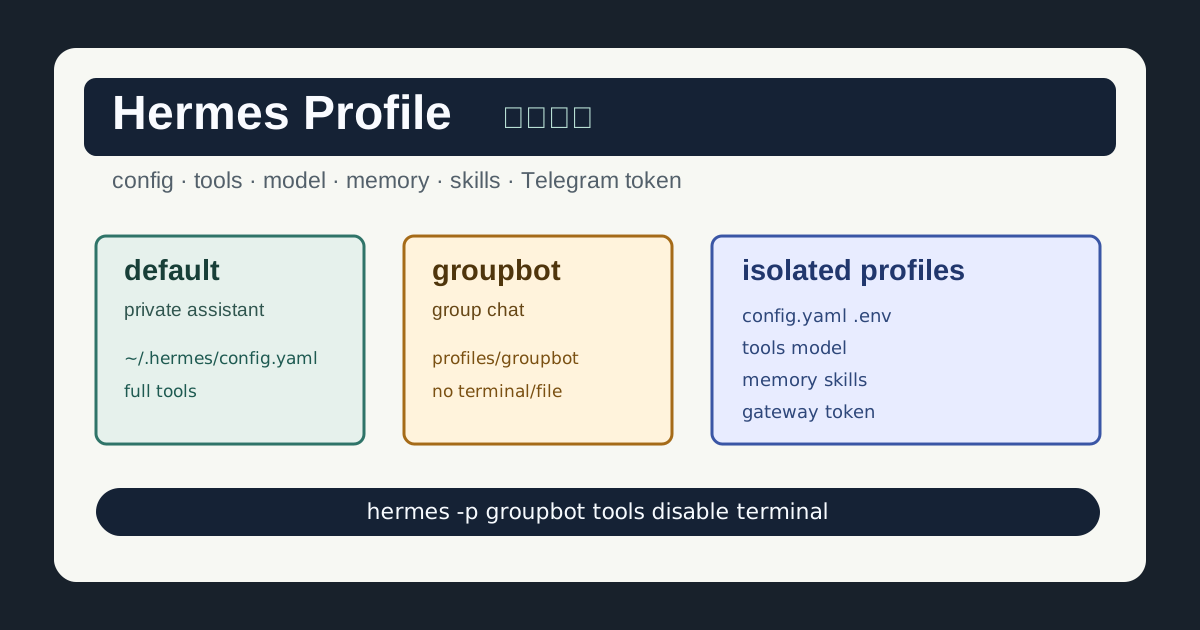
Hermes 的 profile 可以理解成几套独立机器人环境。不同 profile 下的工具开关、模型、记忆、skills、sessions、Telegram token 和 gateway 配置基本都是隔离的。
这篇不是从零部署教程,而是一份查询手册。已经装好 Hermes 后,如果你想把默认私聊机器人、群聊机器人、私人全能机器人、看图/生图机器人分开管理,可以直接按下面的小节查命令。
最重要的一句话:操作具名 profile 时一定要带 -p <profile> 或 --profile <profile>。不带 profile 的命令通常会改默认机器人。
速查表
| 需求 | 命令或路径 |
|---|---|
| 默认 profile 配置 | ~/.hermes/config.yaml |
| 默认 profile 密钥 | ~/.hermes/.env |
groupbot 配置 | ~/.hermes/profiles/groupbot/config.yaml |
groupbot 密钥 | ~/.hermes/profiles/groupbot/.env |
| 查看 profile | hermes profile list |
| 创建 profile | hermes profile create groupbot |
| 复制当前配置创建 | hermes profile create groupbot --clone |
| 尽量完整复制创建 | hermes profile create groupbot --clone-all |
| 查看工具 | hermes -p groupbot tools list |
| 进入工具开关界面 | hermes -p groupbot tools |
| 配置模型 | hermes -p groupbot model |
| 配置 Telegram | hermes -p groupbot gateway setup |
| 重启 gateway | hermes -p groupbot gateway restart |
| 查看 gateway 状态 | hermes -p groupbot gateway status |
Profile 配置文件在哪里
默认 profile:
~/.hermes/config.yaml
~/.hermes/.env
具名 profile 例如 groupbot:
~/.hermes/profiles/groupbot/config.yaml
~/.hermes/profiles/groupbot/.env
常见拆法:
| 机器人 | profile | 配置文件 |
|---|---|---|
| 默认机器人 | default | ~/.hermes/config.yaml |
| 群聊机器人 | groupbot | ~/.hermes/profiles/groupbot/config.yaml |
| 私人全能机器人 | privatebot | ~/.hermes/profiles/privatebot/config.yaml |
| 看图/生图机器人 | imagebot | ~/.hermes/profiles/imagebot/config.yaml |
对应的 Telegram bot token、模型 API key 等敏感信息,放在该 profile 自己的 .env 里。不要让群聊 bot 和私聊 bot 共用同一个 Telegram token。
查看 Profile 列表
查看当前已有 profile:
hermes profile list如果你只是执行:
hermes tools通常改的是 default profile。要改 groupbot,写成:
hermes -p groupbot tools创建新 Profile
创建一个专门给群聊使用的机器人:
hermes profile create groupbot如果想从当前默认配置复制一份再改:
hermes profile create groupbot --clone如果想连 skills、memory、auth、sessions 等也尽量复制:
hermes profile create groupbot --clone-all怎么选:
| 场景 | 建议 |
|---|---|
| 新建干净群聊机器人 | hermes profile create groupbot |
| 复制基础模型、显示和常规配置后再改 | hermes profile create groupbot --clone |
| 完整复制一个现有机器人做迁移或备份测试 | hermes profile create groupbot --clone-all |
--clone-all 不适合随手创建群 bot,因为它可能把不该带进群聊环境的记忆、会话、auth 或 skills 状态也复制过去。
对指定 Profile 开关工具
关键就是加 -p profile名 或 --profile profile名。
查看 groupbot 的工具:
hermes -p groupbot tools list进入 groupbot 的交互式工具开关界面:
hermes -p groupbot tools给 groupbot 开启 web:
hermes -p groupbot tools enable web给 groupbot 关闭 terminal:
hermes -p groupbot tools disable terminal给 groupbot 关闭 file:
hermes -p groupbot tools disable file不要写成:
hermes tools disable terminal这条通常改的是 default profile,而不是 groupbot。
不同 Profile 推荐怎么分
| profile | 用途 | 工具策略 |
|---|---|---|
| default | 自己私聊全功能助手 | 可以开启 terminal、file、web、browser、vision、image_gen |
| groupbot | 群聊文字机器人 | 关闭 terminal、file、cronjob、messaging、browser |
| privatebot | 私人全能机器人 | 单独 token、单独模型、比群 bot 多开工具 |
| imagebot | 看图/生图机器人 | 开 vision 和 image_gen,关 terminal 和 file |
默认私聊助手可以开启:
hermes tools enable terminal
hermes tools enable file
hermes tools enable web
hermes tools enable browser
hermes tools enable vision
hermes tools enable image_gen
群聊机器人建议关闭危险工具:
hermes -p groupbot tools disable terminal
hermes -p groupbot tools disable file
hermes -p groupbot tools disable cronjob
hermes -p groupbot tools disable messaging
hermes -p groupbot tools disable browser
群聊机器人可以保留:
hermes -p groupbot tools enable skills
hermes -p groupbot tools enable clarify
如果你愿意让群 bot 查资料,可以可选开启:
hermes -p groupbot tools enable web看图/生图机器人可以开启:
hermes -p imagebot tools enable vision
hermes -p imagebot tools enable image_gen
同时关闭:
hermes -p imagebot tools disable terminal
hermes -p imagebot tools disable file
工具名称会随 Hermes 版本和已安装集成略有不同,实际以工具列表为准:
hermes tools list
hermes -p groupbot tools list
给 Profile 单独配置模型
进入 groupbot 的模型配置界面:
hermes -p groupbot model也可以直接写配置,例如给群 bot 使用 OpenRouter 上的便宜模型:
hermes -p groupbot config set model.provider openrouter
hermes -p groupbot config set model.default openai/gpt-4o-mini
私人 bot 可以单独配置更强模型:
hermes -p privatebot model或者直接设置:
hermes -p privatebot config set model.provider openrouter
hermes -p privatebot config set model.default anthropic/claude-sonnet-4
模型 API key 建议放在对应 profile 的 .env 里:
~/.hermes/profiles/groupbot/.env
~/.hermes/profiles/privatebot/.env
不要把真实 API key 写进文章、聊天记录或 Git 仓库。
给 Profile 单独配置 Telegram Gateway
给某个 profile 配 Telegram:
hermes -p groupbot gateway setup启动或重启这个 profile 的 gateway:
hermes -p groupbot gateway restart查看状态:
hermes -p groupbot gateway status如果你有多个 Telegram bot token,一般这样分:
| profile | Telegram token |
|---|---|
| groupbot | 群聊 bot token |
| privatebot | 私人 bot token |
| imagebot | 图片 bot token |
每个 profile 单独 gateway setup,每个 profile 单独跑 gateway 服务。不要让两个 profile 同时使用同一个 Telegram bot token,否则可能出现消息路由混乱,甚至两个 gateway 抢同一个 bot。
配置完成后,在对应 Telegram bot 里发送:
/sethome让这个 profile 记住自己的 home channel。
确认 Gateway 服务名
不同版本、不同安装方式下,profile gateway 的 systemd 服务名可能不一样。先列出来:
systemctl --user list-units 'hermes*' --no-pager常见服务名可能类似:
hermes-gateway.service
hermes-gateway-groupbot.service
hermes-gateway-privatebot.service
如果需要直接用 systemd 管理,使用真实服务名:
systemctl --user restart hermes-gateway-groupbot.service
systemctl --user status hermes-gateway-groupbot.service --no-pager
如果当前 Hermes 版本的 gateway 命令已经能正确识别 profile,优先用:
hermes -p groupbot gateway restart
hermes -p groupbot gateway status
Profile 隔离了哪些东西
可以按下面理解:
| 隔离项 | 说明 |
|---|---|
config.yaml | 每个 profile 可以有自己的模型、工具和行为配置 |
.env | 每个 profile 可以有自己的 token 和 API key |
| tools/toolsets | 群 bot 可以关危险工具,私聊 bot 可以多开能力 |
| model | 群 bot 用便宜模型,私人 bot 用强模型 |
| skills | 不同 profile 可使用不同技能集 |
| memories | 群聊记忆和私聊记忆分开 |
| sessions | 会话历史分开 |
| gateway | Telegram gateway 配置和状态分开 |
| Telegram token | 每个 bot 使用自己的 token |
所以工具命令一定要带 profile:
hermes -p groupbot tools而不是:
hermes tools后者通常改的是 default profile。
groupbot 落地顺序
创建群聊机器人 groupbot 时,可以按这个顺序走:
- 创建 profile:
hermes profile create groupbot --clone- 配置专属 Telegram gateway:
hermes -p groupbot gateway setup- 配置群 bot 模型:
hermes -p groupbot model- 收窄群 bot 工具权限:
hermes -p groupbot tools disable terminal
hermes -p groupbot tools disable file
hermes -p groupbot tools disable cronjob
hermes -p groupbot tools disable messaging
hermes -p groupbot tools disable browser
hermes -p groupbot tools enable skills
hermes -p groupbot tools enable clarify- 启动或重启 gateway:
hermes -p groupbot gateway restart
hermes -p groupbot gateway status- 在对应 Telegram bot 里发送:
/sethome- 发一句测试消息,确认它读的是群 bot 的模型、群 bot 的 token、群 bot 的工具权限。
常见误操作
| 误操作 | 结果 | 正确做法 |
|---|---|---|
hermes tools disable terminal | 关掉 default profile 的 terminal | hermes -p groupbot tools disable terminal |
| 两个 profile 共用一个 Telegram token | 两个 gateway 抢同一个 bot | 每个 profile 一个 bot token |
用 --clone-all 创建群 bot | 可能把记忆、会话和 auth 状态也复制过去 | 群 bot 用普通 create 或 --clone |
| 群 bot 开 terminal/file | 群聊里风险过高 | 群 bot 默认关闭危险工具 |
忘记 /sethome | Gateway 可能找不到 home channel | 在对应 bot 会话里执行 /sethome |
最后记住
Hermes profile 的价值不是“多几个配置文件”,而是让不同机器人拥有不同边界:群聊 bot 保守,私聊 bot 能力强,图片 bot 专注视觉,代码 bot 专注开发。
只要记住所有关键命令都带 -p <profile>,多机器人环境就不会互相污染。