
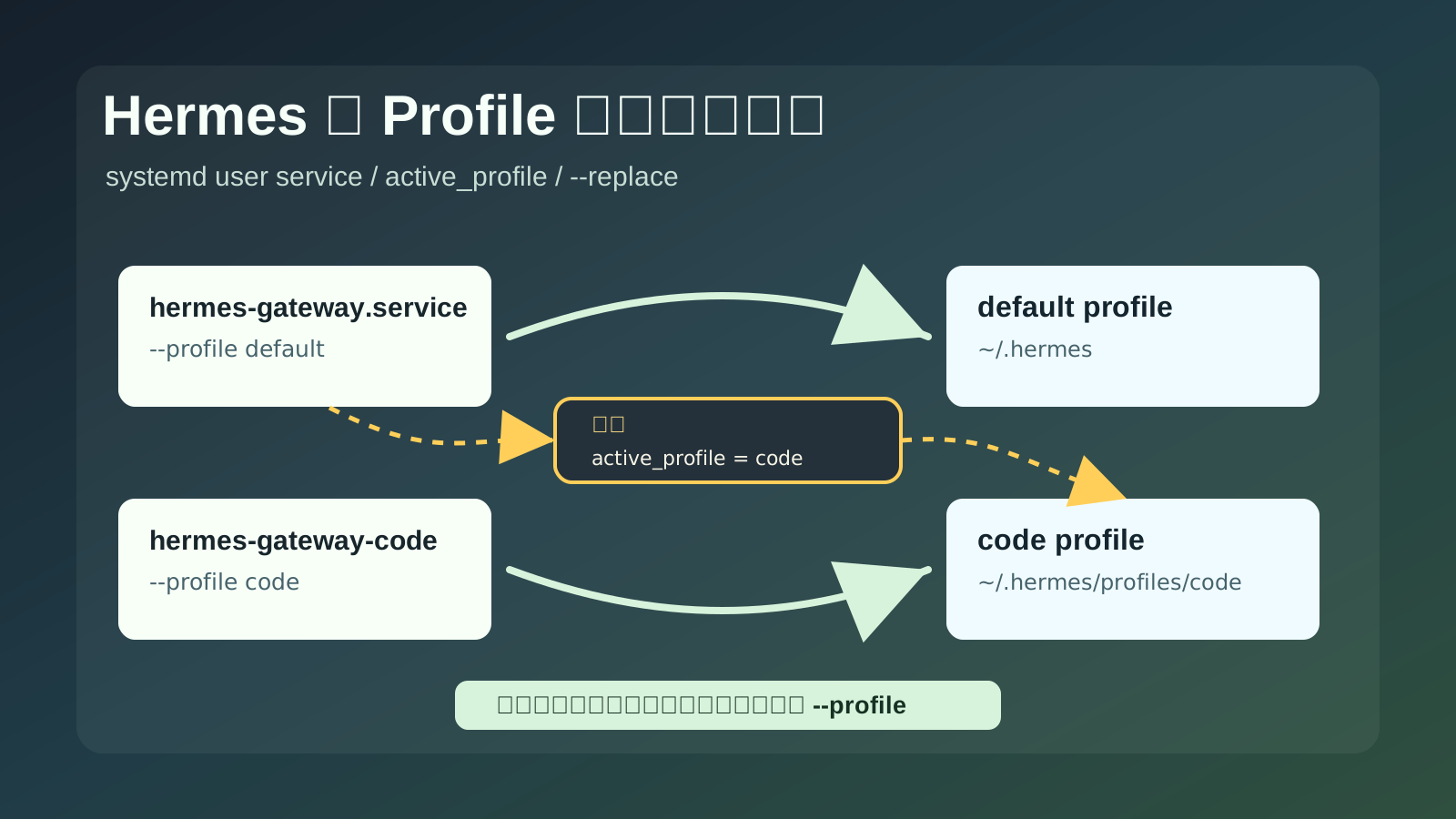
这篇记录一个很隐蔽的 Hermes 多 profile 网关坑:明明配置了两个机器人网关,一个 default,一个 code,但它们不能稳定同时运行。现象看起来像“网关没启动起来”,实际是两个 systemd user service 都跑到了同一个 profile,然后通过 --replace 互相顶掉。
如果你是第一次遇到,最容易误判成 Telegram 网络问题、systemd 重启策略问题,或者 Hermes 自己崩了。真正的根因更小:default 网关服务没有显式写 --profile default。
适用场景
这篇适合下面这种情况:
| 项目 | 示例 |
|---|---|
| 系统用户 | hermesuser |
| Hermes 根目录 | /home/hermesuser/.hermes |
| 默认 profile | /home/hermesuser/.hermes |
| 具名 profile | /home/hermesuser/.hermes/profiles/code |
| default 网关服务 | /home/hermesuser/.config/systemd/user/hermes-gateway.service |
| code 网关服务 | /home/hermesuser/.config/systemd/user/hermes-gateway-code.service |
目标是两个服务都常驻运行:
hermes-gateway.service
hermes-gateway-code.service
并且两个服务分别绑定自己的 profile,而不是都跑到同一个 profile。
故障现象
查看 systemd user service:
sudo -u hermesuser env \
  XDG_RUNTIME_DIR=/run/user/1001 \
  DBUS_SESSION_BUS_ADDRESS=unix:path=/run/user/1001/bus \
  systemctl --user list-units '*hermes-gateway*' --all --no-pager
可能会看到类似结果:
hermes-gateway-code.service loaded active     running      Hermes Agent Gateway
hermes-gateway.service      loaded activating auto-restart Hermes Agent Gateway
也可能两个服务轮流 active,但过一会儿又被重启。
查看日志:
sudo -u hermesuser env \
  XDG_RUNTIME_DIR=/run/user/1001 \
  DBUS_SESSION_BUS_ADDRESS=unix:path=/run/user/1001/bus \
  journalctl --user -u hermes-gateway.service -n 120 --no-pager
常见关键信息:
Shutdown context: signal=SIGTERM under_systemd=yes
Another gateway instance (...) started during our startup. Exiting to avoid double-running.
这两行组合起来,基本就说明不是 Telegram 单纯断线,也不是进程自然崩溃,而是另一个 Hermes gateway 实例在启动时把当前实例顶掉了。
先确认当前 active profile
查看:
cat /home/hermesuser/.hermes/active_profile如果输出是:
code表示当前交互式默认 profile 是 code。
注意,active_profile 本身不是错误。它对日常命令很方便,比如你执行 hermes tools、hermes gateway status 时,可以自动作用到当前 profile。
坑在于:常驻服务不应该依赖这个动态文件决定身份。
看两个 service 到底写了什么
查看 default 服务:
cat /home/hermesuser/.config/systemd/user/hermes-gateway.service错误版本里,ExecStart 可能是这样:
ExecStart=/home/hermesuser/.hermes/hermes-agent/venv/bin/python -m hermes_cli.main gateway run --replace重点是这里没有:
--profile default再看 code 服务:
cat /home/hermesuser/.config/systemd/user/hermes-gateway-code.service正常情况下,它会写得更明确:
ExecStart=/home/hermesuser/.hermes/hermes-agent/venv/bin/python -m hermes_cli.main --profile code gateway run --replace这就出现了一个不对称:
| 服务 | 看起来想跑 | 实际 profile 来源 |
|---|---|---|
hermes-gateway.service | default | 没写 --profile,会读取 active_profile |
hermes-gateway-code.service | code | 显式写了 --profile code |
如果 /home/hermesuser/.hermes/active_profile 内容是 code,那么 default 服务实际也会跑到 code。
为什么会打架
Hermes gateway 启动命令里有:
--replace这个参数本来是好东西。它的作用是:如果同一个 profile 下已经有 gateway 实例,就让新实例替换旧实例,避免一个 profile 双开。
但当两个 systemd 服务都误跑到 code profile 后,事情就变成这样:
hermes-gateway-code.service启动codegateway。hermes-gateway.service因为没有--profile default,读取active_profile=code,也启动codegateway。- 两边都有
--replace。 - 后启动的一方认为“同 profile 已有实例”,于是给另一方发
SIGTERM。 - 被杀的一方退出后,systemd 又因为
Restart=always把它拉起来。 - 它重新启动后,又把另一方顶掉。
于是你看到的就是 auto-restart、SIGTERM、另一个实例启动、服务不稳定。
为什么会没写 –profile default
这个坑来自两个逻辑叠加。
第一层:default profile 在很多 CLI 逻辑里被当作“没有具名 profile”,所以生成 default 服务时,历史上可能写成:
python -m hermes_cli.main gateway run --replace而不是:
python -m hermes_cli.main --profile default gateway run --replace第二层:Hermes 启动器为了方便交互式使用,如果命令里没有显式 --profile,会读取:
/home/hermesuser/.hermes/active_profile这两个逻辑单独看都说得通,但放到 systemd 常驻服务里就会出问题。
常驻服务应该固定身份。default 服务就该明确写 --profile default,code 服务就该明确写 --profile code。
一开始怎么避免这个坑
最稳的办法是:创建任何 systemd 常驻 gateway 时,都不要让它“猜” profile。
哪怕是 default profile,也要显式写:
--profile default具名 profile 也要显式写自己的名字:
--profile code也就是说,两个机器人网关从一开始就应该长这样:
ExecStart=/home/hermesuser/.hermes/hermes-agent/venv/bin/python -m hermes_cli.main --profile default gateway run --replaceExecStart=/home/hermesuser/.hermes/hermes-agent/venv/bin/python -m hermes_cli.main --profile code gateway run --replace如果你的第二个 profile 叫 groupbot,就写:
ExecStart=/home/hermesuser/.hermes/hermes-agent/venv/bin/python -m hermes_cli.main --profile groupbot gateway run --replace不要写成:
ExecStart=/home/hermesuser/.hermes/hermes-agent/venv/bin/python -m hermes_cli.main gateway run --replace这行看起来像 default,实际上它会受 /home/hermesuser/.hermes/active_profile 影响。今天 active_profile 是 default 时它没事,明天你切到 code,它就可能跟着跑到 code。
建完服务后立刻做一次体检
每次创建或修改 gateway service 后,先查 ExecStart:
grep '^ExecStart' \
  /home/hermesuser/.config/systemd/user/hermes-gateway.service \
  /home/hermesuser/.config/systemd/user/hermes-gateway-code.service
你要看到两个不同的 profile:
--profile default
--profile code
再查两个服务是否都启用:
sudo -u hermesuser env \
  XDG_RUNTIME_DIR=/run/user/1001 \
  DBUS_SESSION_BUS_ADDRESS=unix:path=/run/user/1001/bus \
  systemctl --user list-unit-files '*hermes-gateway*' --no-pager
期望类似:
hermes-gateway.service      enabled
hermes-gateway-code.service enabled
最后查锁文件是不是分开:
cat /home/hermesuser/.hermes/gateway.lock
cat /home/hermesuser/.hermes/profiles/code/gateway.lock
两个锁文件路径不同、PID 不同,就说明两个网关不是在抢同一个 profile。
记住一个原则
active_profile 适合给人手动敲命令时省事,不适合给 systemd 常驻服务当身份来源。
日常交互可以这样:
hermes gateway status但 systemd 里最好永远写成这样:
hermes --profile default gateway run --replace
hermes --profile code gateway run --replace
常驻服务的身份越固定,排障时越省命。
修复前先备份 service 文件
先备份:
cp /home/hermesuser/.config/systemd/user/hermes-gateway.service \
  /home/hermesuser/.config/systemd/user/hermes-gateway.service.bak.$(date +%Y%m%d-%H%M%S)
如果你只想手工编辑,打开:
nano /home/hermesuser/.config/systemd/user/hermes-gateway.service找到 ExecStart= 这一行。
正确修改 hermes-gateway.service
把这一行:
ExecStart=/home/hermesuser/.hermes/hermes-agent/venv/bin/python -m hermes_cli.main gateway run --replace改成:
ExecStart=/home/hermesuser/.hermes/hermes-agent/venv/bin/python -m hermes_cli.main --profile default gateway run --replace也就是只加这一段:
--profile default不要删掉后面的:
gateway run --replacecode service 应该保持这样
检查:
grep '^ExecStart' /home/hermesuser/.config/systemd/user/hermes-gateway-code.service期望看到:
ExecStart=/home/hermesuser/.hermes/hermes-agent/venv/bin/python -m hermes_cli.main --profile code gateway run --replace如果你的 profile 名不是 code,例如 groupbot,那对应服务应该写成:
ExecStart=/home/hermesuser/.hermes/hermes-agent/venv/bin/python -m hermes_cli.main --profile groupbot gateway run --replace原则很简单:每个常驻网关服务都必须显式写自己的 --profile <name>。
重新加载 systemd user 配置
因为这是 user service,不是系统级 service,不能只用普通的 systemctl daemon-reload。
先确认 hermesuser 的 UID:
id hermesuser示例输出:
uid=1001(hermesuser) gid=1001(hermesuser) groups=1001(hermesuser),27(sudo),987(docker)这里 UID 是 1001,所以下面的路径用 /run/user/1001。
执行:
sudo -u hermesuser env \
  XDG_RUNTIME_DIR=/run/user/1001 \
  DBUS_SESSION_BUS_ADDRESS=unix:path=/run/user/1001/bus \
  systemctl --user daemon-reload
然后启用并启动两个 gateway:
sudo -u hermesuser env \
  XDG_RUNTIME_DIR=/run/user/1001 \
  DBUS_SESSION_BUS_ADDRESS=unix:path=/run/user/1001/bus \
systemctl --user enable --now hermes-gateway.servicesudo -u hermesuser env \
XDG_RUNTIME_DIR=/run/user/1001 \
DBUS_SESSION_BUS_ADDRESS=unix:path=/run/user/1001/bus \
systemctl --user enable --now hermes-gateway-code.service验证两个服务都活着
执行:
sudo -u hermesuser env \
  XDG_RUNTIME_DIR=/run/user/1001 \
  DBUS_SESSION_BUS_ADDRESS=unix:path=/run/user/1001/bus \
  systemctl --user is-active hermes-gateway.service hermes-gateway-code.service
期望输出:
active
active
再看列表:
sudo -u hermesuser env \
  XDG_RUNTIME_DIR=/run/user/1001 \
  DBUS_SESSION_BUS_ADDRESS=unix:path=/run/user/1001/bus \
  systemctl --user list-units '*hermes-gateway*' --all --no-pager
期望两个都是:
active running验证两个锁文件不是同一个 profile
default gateway 的锁文件:
cat /home/hermesuser/.hermes/gateway.lockcode gateway 的锁文件:
cat /home/hermesuser/.hermes/profiles/code/gateway.lock你应该能看到两个不同的 PID。
再查进程:
ps -fwwp <default-pid>,<code-pid>期望类似:
/home/hermesuser/.hermes/hermes-agent/venv/bin/python -m hermes_cli.main --profile default gateway run --replace
/home/hermesuser/.hermes/hermes-agent/venv/bin/python -m hermes_cli.main --profile code gateway run --replace
只要这里一个是 --profile default,一个是 --profile code,就不会再互相顶掉。
验证 Telegram 已连接
default 日志:
tail -n 40 /home/hermesuser/.hermes/logs/gateway.logcode 日志:
tail -n 40 /home/hermesuser/.hermes/profiles/code/logs/gateway.log期望看到:
Connected to Telegram (polling mode)
Gateway running with 1 platform(s)
两个日志目录不同,这一点也很重要:
| profile | 日志路径 |
|---|---|
| default | /home/hermesuser/.hermes/logs/gateway.log |
| code | /home/hermesuser/.hermes/profiles/code/logs/gateway.log |
如果两个服务都写到同一个日志目录,通常说明 profile 还是没隔离好。
如果还是互相 SIGTERM
先看两个 ExecStart:
grep '^ExecStart' \
  /home/hermesuser/.config/systemd/user/hermes-gateway.service \
  /home/hermesuser/.config/systemd/user/hermes-gateway-code.service
正确结果应该类似:
/home/hermesuser/.config/systemd/user/hermes-gateway.service:ExecStart=... hermes_cli.main --profile default gateway run --replace
/home/hermesuser/.config/systemd/user/hermes-gateway-code.service:ExecStart=... hermes_cli.main --profile code gateway run --replace
再查 active_profile:
cat /home/hermesuser/.hermes/active_profile这个文件可以是 code,也可以是别的 profile。只要 systemd service 里已经显式写了 --profile default 和 --profile code,常驻服务就不会再被 active_profile 带偏。
小结
这次坑的核心不是 --replace 错,也不是 systemd 错,更不是多 profile 本身不能双开。
真正的问题是:常驻服务没有写死自己的 profile。
记住这个规则:
交互式命令可以依赖 active_profile。
systemd 常驻服务必须显式写 --profile。
default profile 也要写:
--profile default不要因为它叫 default,就让它空着。空着的时候,它就不一定是 default。