
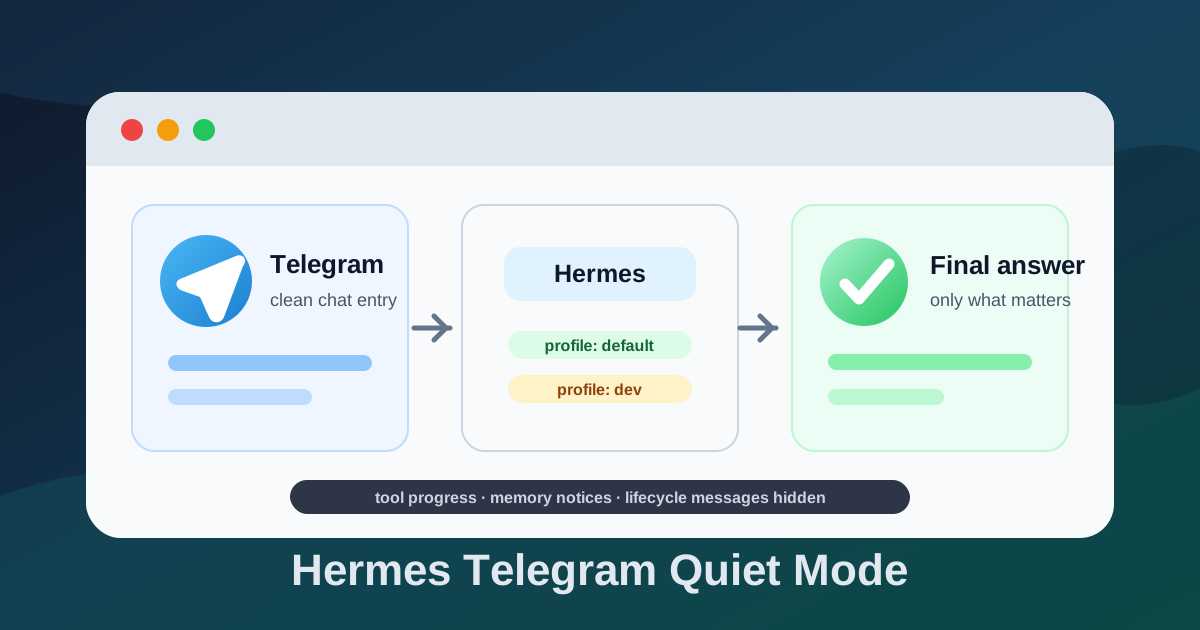
这份手册用于在新设备或新服务器上快速恢复 Hermes Agent 的 Telegram 安静配置。
目标很简单:让 Telegram 里的 Hermes 像一个干净的日常助手,只回复最终答案,不在聊天窗口里显示工具进度、记忆更新、后台任务、引用上一句话等内部信息;gateway 重启或上线时可以保留一条提醒,方便确认机器人恢复在线。
如果你想系统了解 ~/.hermes/config.yaml 每个配置段的作用,可以先看这篇:Hermes Agent config.yaml 中文配置说明。
配置示例会尽量写成公版形式,不绑定具体用户名。实际使用时,把路径里的 $HERMES_HOME、$HOME、<profile>、<user>、<service> 替换成自己的环境即可。
适用场景
- 已安装 Hermes Agent。
- 已配置 Telegram bot token。
- 已配置模型 API。
- 希望 Telegram 聊天窗口保持干净。
- 需要给多个 profile 复用同一套安静显示策略,例如默认助手和开发助手。
关键原则
- 保留记忆功能,但不显示
memory:通知。 - 保留工具和后台能力,但不显示工具进度。
- 保留开发和运维能力,但 Telegram 里只显示最终回复、必要心跳和心跳里的工作进度细节。
- 不开启全局 yolo 权限,危险命令仍然需要确认。
- 优先使用
hermes config set这类官方命令调整参数,让 Hermes 自己维护配置文件结构;手改config.yaml只作为对照和兜底。 - 不把私钥、API Key、Telegram Token、SSH 密码写进文档。
目录变量约定
Hermes 默认配置目录通常在当前用户的 home 目录下:
HERMES_HOME="${HOME}/.hermes"默认 profile 配置文件:
"${HERMES_HOME}/config.yaml"其他 profile 配置目录通常类似:
"${HERMES_HOME}/profiles/<profile>"例如开发 profile:
"${HERMES_HOME}/profiles/dev/config.yaml"如果服务部署在专用 Linux 用户下,例如 hermesuser、hermes、agent,先切到对应用户,或明确使用对应用户的 home 目录:
sudo -iu <user>
echo "$HOME"
后续命令都假设已经在运行 Hermes 的那个用户环境中执行。
新装后手搓命令版
新装 Hermes 后,先备份当前配置:
cp "${HERMES_HOME}/config.yaml" "${HERMES_HOME}/config.yaml.bak.$(date +%Y%m%d-%H%M%S)"然后优先用官方命令写入配置。下面这 11 条就是安静模式的核心手搓清单:
hermes config set approvals.mode smart中文注释:开启智能审批模式。低风险命令自动放行,高风险命令仍然提示确认。比 manual 少打扰,比 YOLO 或 off 安全。
hermes config set command_allowlist '["stop/restart system service"]'中文注释:加入命令审批白名单,允许“停止/重启系统服务”这类操作更容易通过审批。注意:这是偏权限放宽的配置,新环境里如果想更保守,可以先不加。
hermes config set display.background_process_notifications off中文注释:关闭后台进程通知。避免后台任务、进程状态变化频繁打扰 Telegram。
hermes config set display.cleanup_progress true中文注释:开启清理进度信息。通常用于让界面或消息里的进度展示更干净,减少残留进度噪声。
hermes config set display.interim_assistant_messages false中文注释:关闭中间态助手消息。减少“我正在处理/中间进度”这类临时消息,更安静。
hermes config set display.tool_progress off中文注释:关闭工具调用进度提示。减少 Telegram 里显示工具执行过程的噪声,只看最终结果。
hermes config set platforms.telegram.extra.disable_link_previews true中文注释:关闭 Telegram 链接预览。避免发送链接时自动展开预览,消息更清爽。
hermes config set platforms.telegram.gateway_restart_notification true中文注释:开启 platforms.telegram 路径下的网关重启/上线提醒。建议和 telegram.gateway_restart_notification 一起设置,避免不同加载路径漏生效。
hermes config set platforms.telegram.reply_to_mode off中文注释:关闭 Telegram 回复引用模式。机器人回复时不引用或挂在线程式回复到原消息,聊天界面更干净。
hermes config set telegram.gateway_restart_notification true中文注释:开启 Telegram 顶层配置里的网关重启/上线提醒。重启后会收到类似 Gateway online 的上线提示。
hermes config set telegram.reply_to_mode off中文注释:关闭 Telegram 顶层配置里的回复引用模式。和 platforms.telegram.reply_to_mode off 建议一起设置。
如果只想先调最核心的几项,可以优先执行:
hermes config set approvals.mode smart
hermes config set display.tool_progress off
hermes config set display.interim_assistant_messages false
hermes config set telegram.reply_to_mode off
hermes config set platforms.telegram.extra.disable_link_previews true
hermes config set telegram.gateway_restart_notification true
hermes config set platforms.telegram.gateway_restart_notification true
这组组合的效果是:审批不裸奔、Telegram 不刷工具过程、不发中间态废话、不引用上一条消息、不展开链接预览,同时保留 gateway 上线提醒。
按功能分类
权限和审批:
hermes config set approvals.mode smart
hermes config set command_allowlist '["stop/restart system service"]'
approvals.mode smart 推荐日常保留;command_allowlist 更偏放权,可以按环境风险决定是否添加。
Telegram 消息降噪:
hermes config set display.tool_progress off
hermes config set display.background_process_notifications off
hermes config set display.interim_assistant_messages false
hermes config set display.cleanup_progress true
hermes config set platforms.telegram.extra.disable_link_previews true
hermes config set telegram.reply_to_mode off
hermes config set platforms.telegram.reply_to_mode off
这些配置负责减少工具进度、后台通知、中间态消息、链接预览和回复引用。
网关上线提醒:
hermes config set telegram.gateway_restart_notification true
hermes config set platforms.telegram.gateway_restart_notification true
这两条是为了保留“机器人恢复在线”的可见信号。安静模式不是完全失联,而是不把内部过程刷到聊天窗口。
Telegram 安静显示配置
如果命令执行后想手动核对,在对应 profile 的 config.yaml 里检查这些字段。
推荐公版配置如下,字段按 Hermes 官方 config.yaml 参考整理:
approvals:
  mode: smart
command_allowlist:
  - stop/restart system service
display:
  personality: technical
  language: zh
  show_reasoning: false
  tool_progress: off
  tool_progress_command: false
  cleanup_progress: true
  interim_assistant_messages: false
  long_running_notifications: true
  busy_ack_detail: true
  background_process_notifications: off
  platforms:
    telegram:
      tool_progress: off
      cleanup_progress: true
      interim_assistant_messages: false
      long_running_notifications: true
      busy_ack_detail: true
      background_process_notifications: off
  runtime_footer:
    enabled: false

streaming:
  enabled: false

platforms:
  telegram:
    reply_to_mode: off
    gateway_restart_notification: true
    extra:
      disable_link_previews: true

telegram:
  reply_to_mode: off
  gateway_restart_notification: true
日常助手可以使用更简洁的风格:
display:
  personality: concise
开发或运维 profile 可以保留技术向风格:
display:
  personality: technical
重点不是 personality 叫什么,而是让 Telegram 不刷屏但不失联。display.tool_progress: off 负责关闭工具进度,display.platforms.telegram.tool_progress: off 负责给 Telegram 单独兜底,display.interim_assistant_messages: false 负责关闭中途自然语言更新,display.long_running_notifications: true 负责保留长任务心跳,display.busy_ack_detail: true 负责在心跳里显示 iteration/API 等进度细节,display.background_process_notifications: off 负责关闭后台进程 watcher 消息,runtime_footer.enabled: false 负责不在最终回复后追加模型、耗时、token、费用等运行信息。
streaming.enabled: false 会关闭消息平台实时流式编辑,Telegram 里通常就只看到最终成稿。工具、记忆、后台任务仍然可以运行,只是不要把内部状态刷到聊天窗口里。
关闭 Telegram 引用上一句话
在同一个 config.yaml 里确认 platforms.telegram 段:
platforms:
  telegram:
    reply_to_mode: off
    gateway_restart_notification: true
    extra:
      disable_link_previews: true
telegram:
  reply_to_mode: off
  gateway_restart_notification: true
官方配置里 Telegram 这类平台专属参数放在 platforms.telegram 下。reply_to_mode: off 可以避免 Telegram 回复气泡引用用户上一条消息;disable_link_previews: true 可以减少 URL 预览造成的聊天噪音。
如果你的旧配置里有下面这种顶层 telegram 段:
telegram:
  reply_to_mode: off
  gateway_restart_notification: true
不要急着删除。实测有些版本仍会把 hermes config set telegram.reply_to_mode off 写回顶层 telegram,并把 off 序列化为 false。这不代表配置失败,只要 hermes config show 和实际 Telegram 行为符合预期即可。修改前可以先备份:
cp "${HERMES_HOME}/config.yaml" "${HERMES_HOME}/config.yaml.bak.$(date +%Y%m%d-%H%M%S)"如果同一个版本同时支持 platforms.telegram 和顶层 telegram,优先保留当前版本真实写入并读取的那一份,避免为了“看起来更官方”而删掉正在生效的字段。
手动 YAML 对照版
如果你必须直接编辑:
"${HERMES_HOME}/config.yaml"可以按下面这些路径核对:
| 配置路径 | 推荐值 | 中文注释 |
|---|---|---|
approvals.mode | smart | 智能审批模式 |
command_allowlist | ["stop/restart system service"] | 允许系统服务 stop/restart 相关命令进入白名单 |
display.background_process_notifications | off | 关闭后台进程通知 |
display.cleanup_progress | true | 清理进度展示 |
display.interim_assistant_messages | false | 关闭中间态助手消息 |
display.tool_progress | off | 关闭工具进度展示 |
platforms.telegram.extra.disable_link_previews | true | 关闭 Telegram 链接预览 |
platforms.telegram.gateway_restart_notification | true | 开启 platforms.telegram 网关上线提醒 |
platforms.telegram.reply_to_mode | off | 关闭 platforms.telegram 回复引用 |
telegram.gateway_restart_notification | true | 开启 Telegram 顶层网关上线提醒 |
telegram.reply_to_mode | off | 关闭 Telegram 顶层回复引用 |
优先建议还是用 hermes config set。手改 YAML 时最容易出错的是缩进、布尔值类型和新旧路径混用。
设置 Telegram Home Channel
第一次使用新 Telegram bot 时,在和 bot 的私聊里发送:
/sethome成功后,Hermes 的环境文件里通常会出现类似配置:
TELEGRAM_HOME_CHANNEL=<your-telegram-user-or-channel-id>
TELEGRAM_HOME_CHANNEL_THREAD_ID=
这样可以避免 Hermes 继续发送类似下面的英文提示:
No home channel is set for Telegram...如果使用 systemd user service,环境文件的位置可能因安装方式不同而变化。优先检查 Hermes 安装文档、当前 service 文件,以及 $HERMES_HOME 目录下是否有 .env 或 profile 专属环境文件。
创建开发 Profile
如果希望把日常助手和开发助手分开,可以创建一个开发 profile:
hermes profile create dev --clone --description '开发/运维专用 Hermes:更适合代码、服务器维护、排障和技术任务;可展示必要技术细节,但 Telegram 里仍然保持安静。'创建后检查配置:
sed -n '1,220p' "${HERMES_HOME}/profiles/dev/config.yaml"如果给开发 profile 做了 wrapper,例如:
"${HOME}/.local/bin/dev"可以用 wrapper 管理开发 profile:
"${HOME}/.local/bin/dev" gateway listwrapper 的名字和路径不固定,按自己的机器习惯来。文档里不要写死成某个具体用户名。
重启服务
配置写完后,需要让 gateway 重新读取配置。默认 profile 可以先用 Hermes 自己的命令:
hermes gateway restart
hermes gateway status
如果你是通过 systemd user service 安装的 gateway,也可以用 systemd:
默认 profile gateway 常见服务名:
systemctl --user restart hermes-gateway.service
systemctl --user status hermes-gateway.service --no-pager
开发 profile gateway 常见服务名:
systemctl --user restart hermes-gateway-dev.service
systemctl --user status hermes-gateway-dev.service --no-pager
如果你的 profile 名不是 dev,服务名也可能不是 hermes-gateway-dev.service。先列出当前 user services:
systemctl --user list-units 'hermes*' --no-pager也可以用 Hermes 自己的 gateway 命令查看:
hermes gateway list开发 wrapper 示例:
"${HOME}/.local/bin/dev" gateway list如果当前 Telegram 回复还没发完,想避免会话被立即重启打断,可以安排一个延迟重启:
systemd-run --user --on-active=5s systemctl --user restart hermes-gateway.service如果服务名不同,先用 systemctl --user list-units 'hermes*' --no-pager 查到真实服务名,再替换命令里的 service 名称。
验证配置
查看默认 profile 的关键显示配置:
grep -nE "approvals:|mode:|command_allowlist|tool_progress|cleanup_progress|interim_assistant_messages|long_running_notifications|busy_ack_detail|background_process_notifications|disable_link_previews|gateway_restart_notification|reply_to_mode|streaming:|display:|platforms:|telegram:" "${HERMES_HOME}/config.yaml"查看开发 profile:
grep -nE "approvals:|mode:|command_allowlist|tool_progress|cleanup_progress|interim_assistant_messages|long_running_notifications|busy_ack_detail|background_process_notifications|disable_link_previews|gateway_restart_notification|reply_to_mode|streaming:|display:|platforms:|telegram:" "${HERMES_HOME}/profiles/dev/config.yaml"确认最近日志里没有继续出现 home channel 提示:
journalctl --user -u hermes-gateway-dev.service --since "10 minutes ago" --no-pager | grep -i "home channel\|No home channel\|sethome"没有输出通常就是正常。
最后在 Telegram 里发一句测试消息。理想表现是:
- 只看到最终回答。
- 不出现
memory:提示。 - 不出现工具进度。
- 不出现后台任务通知。
- 不引用用户上一句话。
- gateway 重启或上线后,只保留一条上线提醒。
敏感信息不要写进文档
不要把这些内容写进公开文档或笔记:
- API Key
- Telegram Bot Token
- SSH 密码
- 私有 Base URL 的鉴权参数
- 任何可直接登录服务器或调用模型服务的凭据
只记录占位符即可:
OPENAI_API_KEY=填自己的
TELEGRAM_BOT_TOKEN=填自己的
OPENAI_BASE_URL=按自己的服务填写
如果使用 OpenAI-compatible provider,也建议只记录 provider 类型和配置位置,不记录真实 token。
推荐恢复顺序
- 安装 Hermes Agent。
- 配置模型 API 和 Telegram bot token。
- 创建需要的 profile,例如
dev。 - 在 Telegram 里发送
/sethome。 - 优先用
hermes config set写入审批、显示、Telegram 降噪和上线提醒配置。 - 重启对应 gateway 服务。
- 用 Telegram 发一句测试消息,确认只返回最终回复;长任务时有带进度细节的心跳。
当前偏好模板
可以把下面这段作为自己的恢复备注:
默认助手:中文、简洁、安静、日常使用。
开发助手:中文、技术向,可以处理开发、排障和运维,但 Telegram 里仍然保持安静。
不显示 memory、工具调用、后台任务、自我改进等过程提示。
保留 gateway 重启/上线提醒,方便知道服务恢复在线。
不引用用户上一句话。
不使用不想用的模型提供商。
使用支持日常聊天和图片分析的 OpenAI-compatible 模型。
危险命令仍然需要确认,不开启全局 yolo。
这套配置的核心不是削弱 Hermes,而是把“能力”和“可见噪音”分开。工具、记忆和后台任务继续保留;Telegram 只做干净入口,方便每天真正使用。