
本文介绍RouterOS拨号、配置DHCP服务器、配置DNS、开启IPv4防火墙等通网的基础配置。桥接接口bridge1、拨号接口pppoe-out1名称若不同则自行替换
1. PPPoE 拨号
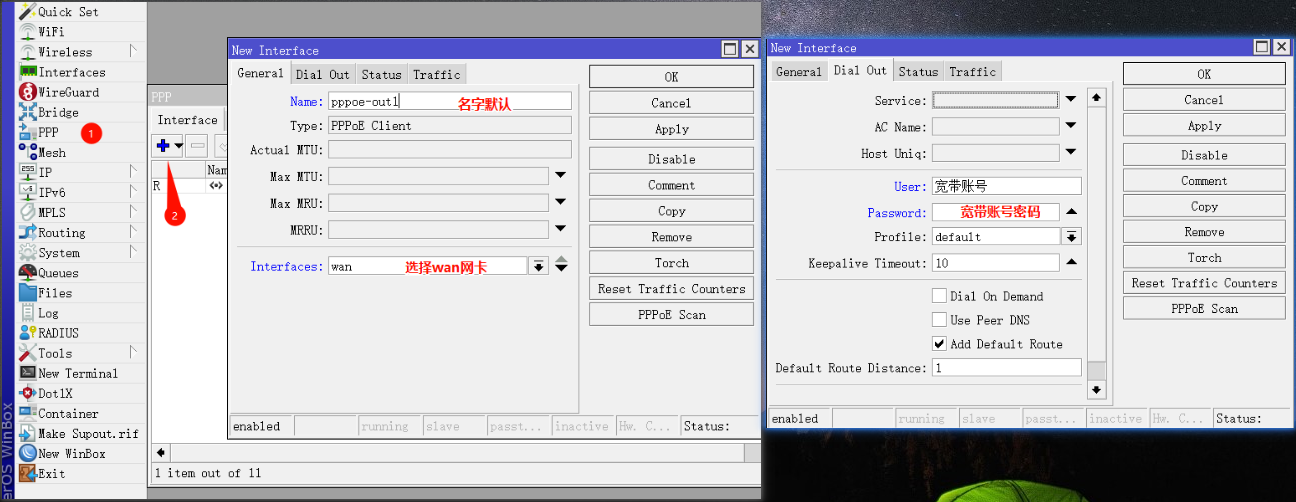
手动配置pppoe-out1接口拨号,User填入宽带账号,Password填入宽带密码。如果不使用运营商提供的DNS可不勾选User Peed DNS。
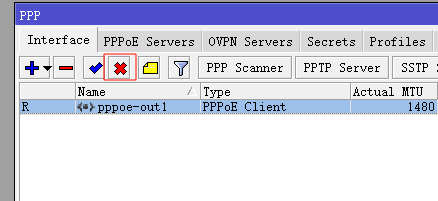
 注:接口前出现“R”代表拨号成功。拨号成功后建议先禁用,待防火墙配置完毕后再开启!
2. DHCP 服务器
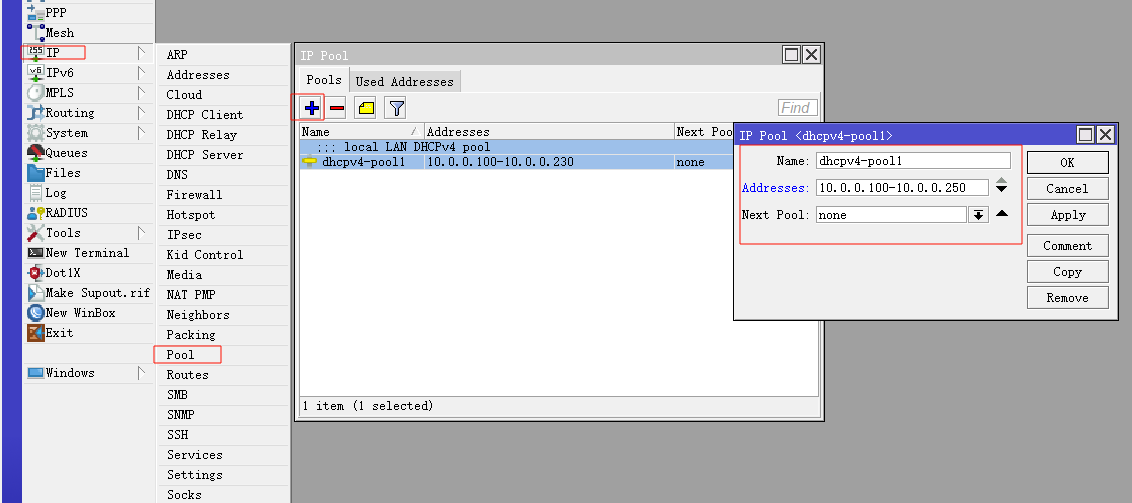
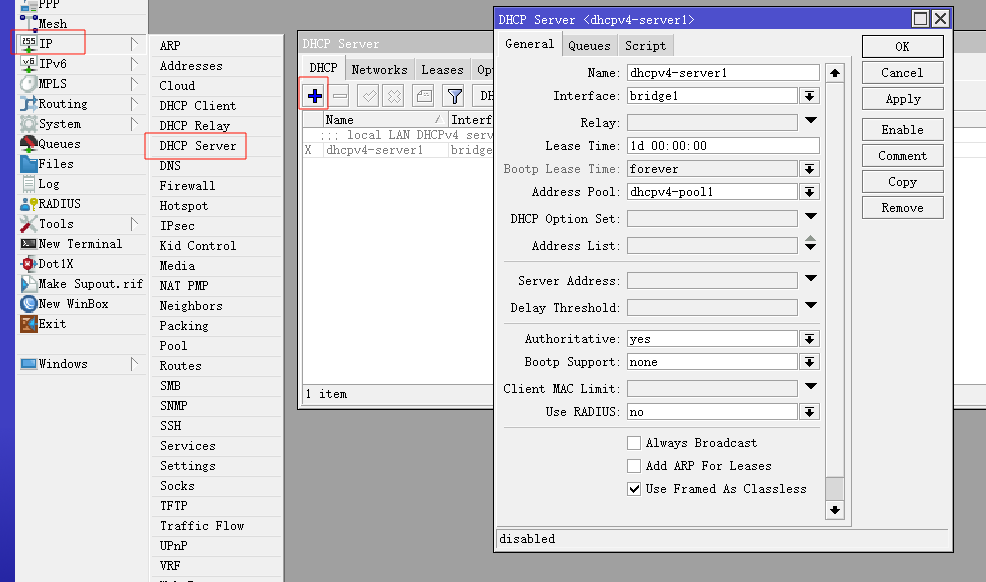
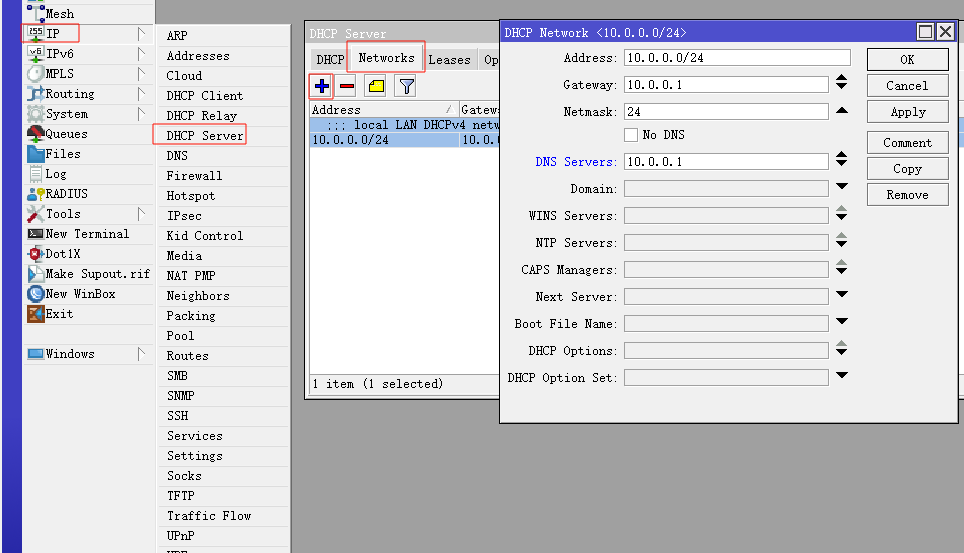
配置DHCP服务器,DHCP IP范围为10.0.0.100-10.0.0.250,网关和DNS默认为ROS。如果希望全局配置透明代理,dns-server可配置为mosdns
/ip pool add name=dhcpv4-pool1 ranges=10.0.0.100-10.0.0.250
/ip dhcp-server add name=dhcpv4-server1 interface=bridge1 address-pool=dhcpv4-pool1 lease-time=1d
/ip dhcp-server network add address=10.0.0.0/24 gateway=10.0.0.1 dns-server=10.0.0.1
(可选)如果某些无线设备隔夜待机后出现本地DNS偶发解析失败,可以尝试开启 Add ARP For Leases:
/ip dhcp-server set dhcpv4-server1 add-arp=yes这个选项会让RouterOS根据DHCP租约自动添加ARP记录。它不是直接修改DNS解析逻辑,而是帮助路由器更稳定地维护“IP地址 -> MAC地址”的对应关系。部分手机在长时间待机、Wi-Fi省电、租约续期或随机MAC场景下,可能出现ARP缓存老化或邻居表状态不稳定,表现出来就像能连上Wi-Fi,但访问本地DNS时偶发失败。开启后,只要手机仍通过DHCP拿到租约,ROS就会根据租约补上对应ARP记录,因此这类设备可能恢复正常,而其它设备因为自身网络栈或省电策略不同,本来就不会触发这个问题。
如果要进一步限制只有DHCP租约设备可以通信,通常还会配合接口的 arp=reply-only 使用;普通家庭网络只为解决个别设备隔夜DNS异常时,可以先只开 add-arp=yes 观察。
需要注意,接口改成 arp=reply-only 后,ROS只会响应ARP表里已有记录的设备。没有通过DHCP获取租约、也没有手动添加静态ARP记录的设备,可能会出现能连上交换机或Wi-Fi,但无法访问网关、无法上网、无法解析DNS的情况。比如手动配置静态IP的NAS、AP、打印机、摄像头、服务器、旁路由等设备,如果没有在ROS里做静态DHCP租约,或者没有对应的静态ARP记录,就可能突然失联。更稳妥的做法是先把这些固定设备改成静态DHCP租约,让它们仍然通过DHCP拿固定地址,再考虑开启 arp=reply-only。
3. DNS
配置DNS,即ROS的上游DNS,先设置223.5.5.5,也可自定义填入运营商分配DNS服务器等
/ip dns set servers=223.5.5.5 allow-remote-requests=yes max-concurrent-queries=4096 max-concurrent-tcp-sessions=512 cache-size=8192 cache-max-ttl=04:00:00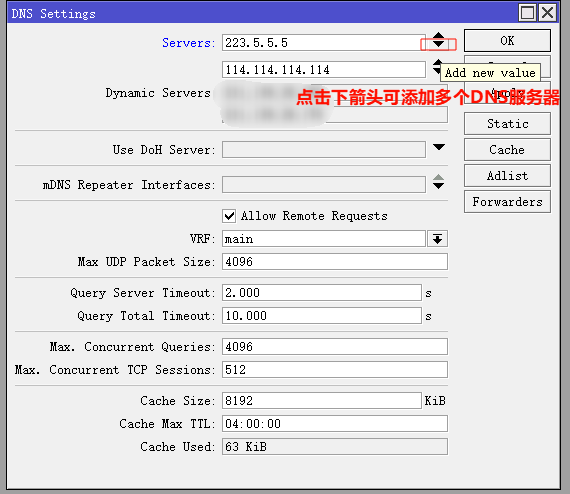
4. 源地址伪装
配置源地址伪装,建议不做接口限制,若后期采用fakeip方案,再加上“排除代理IP列表的操作”
/ip firewall nat add action=masquerade chain=srcnat comment="defconf: masquerade IPv4"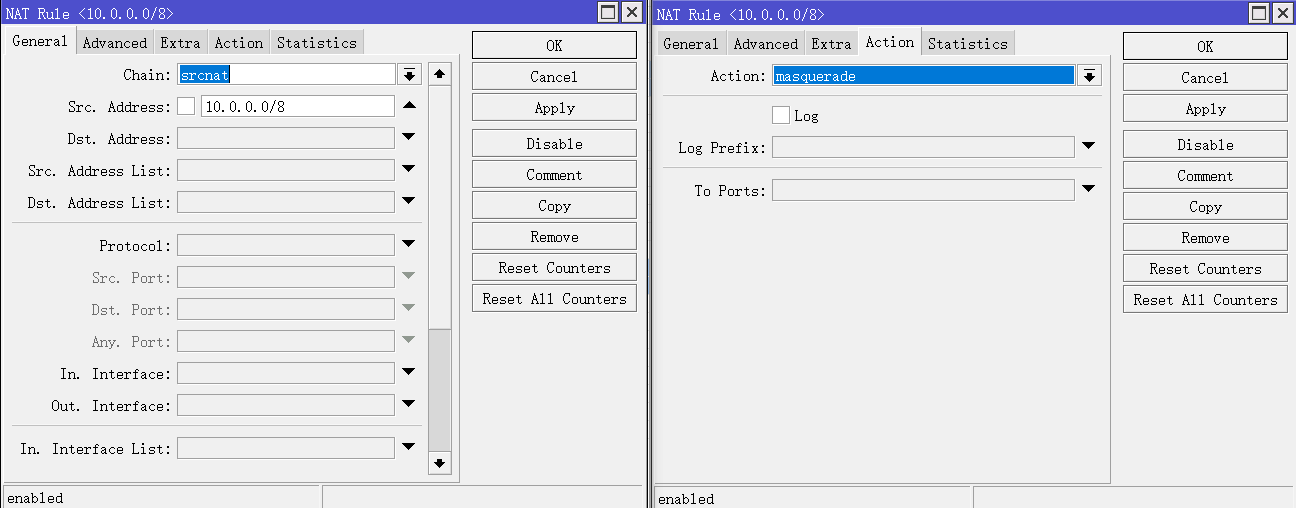 至此打开pppoe接口即可通网,但建议继续配置完防火墙再通网!
5. 访问光猫
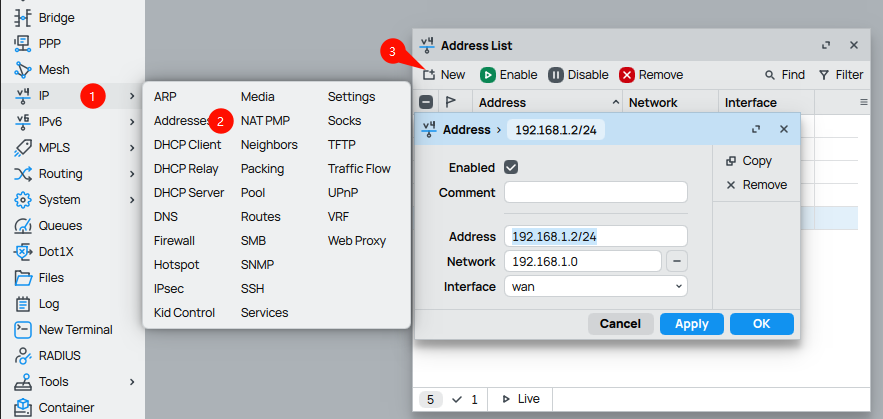
如果需要访问光猫,则为wan口分配一个光猫同网段的IP地址。一般为192.168.1.0/24网段。注意interface为物理接口wan,不是拨号口
防火墙源于@Ron佬2月10日版本,感谢感谢~
6. IPv4 防火墙
添加防火墙规则 注:5391是Winbox登陆端口,可以加上想隐藏的端口。如果在NAT有映射,端口无法隐藏。 注:UDP协议 dst-port=!53,853,5391 可以加上wireguard端口,防止触发PSD,造成IP被Block。
/ip firewall filter add action=accept chain=forward in-interface=bridge1
/ip firewall filter add action=accept chain=input in-interface=bridge1
/ip firewall filter add action=accept chain=forward connection-state=established,related,untracked
/ip firewall filter add action=accept chain=input connection-state=established,related
/ip firewall filter add action=drop chain=input src-address-list=BlockIP in-interface=pppoe-out1
/ip firewall filter add action=drop chain=input connection-state=invalid in-interface=pppoe-out1
/ip firewall filter add action=drop chain=input protocol=icmp in-interface=pppoe-out1
/ip firewall filter add action=drop chain=input protocol=tcp dst-port=53,5391 in-interface=pppoe-out1
/ip firewall filter add action=drop chain=input protocol=udp dst-port=53,5391 in-interface=pppoe-out1
/ip firewall filter add action=add-src-to-address-list chain=input address-list=BlockIP address-list-timeout=1w protocol=tcp dst-port=!53,853,5391 tcp-flags=rst in-interface=pppoe-out1 psd=21,5s,3,1
/ip firewall filter add action=add-src-to-address-list chain=input address-list=BlockIP address-list-timeout=1w protocol=tcp dst-port=!53,853,5391 tcp-flags=syn in-interface=pppoe-out1 psd=21,5s,3,1
/ip firewall filter add action=add-src-to-address-list chain=input address-list=BlockIP address-list-timeout=1w protocol=udp dst-port=!53,853,5391 in-interface=pppoe-out1 psd=21,5s,3,1
/ip firewall filter add action=drop chain=input src-address-list=BlockIP
7. TCP MSS
/ip firewall mangle add action=change-mss chain=forward protocol=tcp tcp-flags=syn new-mss=clamp-to-pmtu passthrough=yes
/ip firewall mangle add action=change-mss chain=output protocol=tcp tcp-flags=syn new-mss=clamp-to-pmtu passthrough=yes
8. 关闭非必要服务端口
/ip firewall service-port disable ftp
/ip firewall service-port disable irc
/ip firewall service-port disable pptp
/ip firewall service-port disable rtsp
/ip firewall service-port disable sip
/ip firewall service-port disable tftp
注:防火墙已配置完毕,可打开pppoe接口开始网上冲浪