
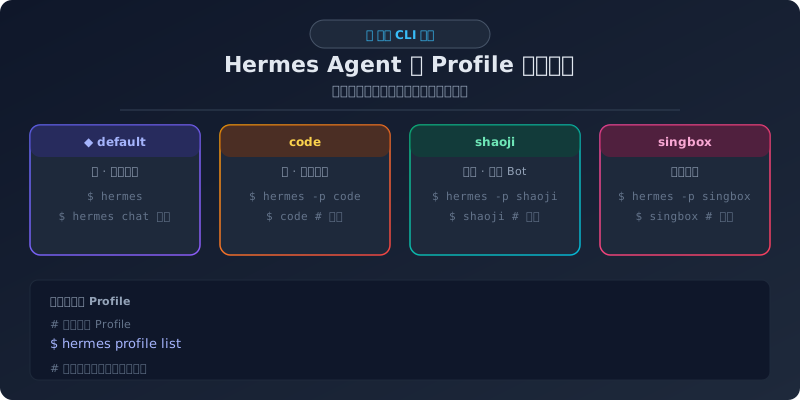
你有没有遇到过这种情况:想让一个 Hermes 实例做日常聊天、另一个专心写代码、再开一个跑业务 Bot——但它们的配置、模型甚至 Telegram Bot Token 都混在一起?
Profile(配置文件) 就是 Hermes 解决这个问题的方案。每个 Profile 就像独立的"分身",有自己的一套配置、技能、记忆、Gateway 甚至模型。
什么是 Profile
Profile 是 Hermes Agent 的多实例隔离方案。每个 Profile 有独立的:
config.yaml— 模型、终端后端、工具集等配置.env— API Key 等密钥skills/— 技能库memory/— 持久化记忆sessions/— 会话记录- Gateway 实例 — 独立的 Telegram/Discord Bot
它们在文件系统上按 Profile 名隔离存放:
~/.hermes/
├── config.yaml           ← default profile(蜜)的配置
├── .env                  ← default profile 的密钥
├── skills/
├── state.db
│
└── profiles/
    ├── code/
    │   ├── config.yaml   ← code profile(佬)的配置
    │   ├── .env
    │   ├── skills/
    │   └── memory_store.db
    │
    └── shaoji/
        ├── config.yaml
        ├── .env
        └── skills/
必备基础操作
列出所有 Profile
hermes profile list输出示例:
Profile          Model                        Gateway      Alias
───────────────    ───────────────────────────    ───────────    ──────
◆ default         deepseek-v4-flash            running      —
  code            deepseek-v4-flash            running      code
  shaoji          glm-5.2                      running      shaoji
  singbox         glm-5.2                      running      singbox
synapse deepseek-v4-flash running synapse- ◆ 标记当前活动的 Profile
- Gateway 列显示该 Profile 的消息网关是否在运行
- Alias 列显示是否有包装命令(后面会讲)
创建新 Profile
# 创建空 Profile
hermes profile create <名称>

# 克隆已有 Profile(推荐——可以保留已有配置作为起点)
hermes profile create <名称> --clone default

# 克隆全部内容(技能、记忆等全部复制)
hermes profile create <名称> --clone-all --clone-from default
创建后需要手动编辑 config.yaml 和 .env 来设置不同的模型和 API Key。
查看 Profile 详情
hermes profile show <名称>指定 Profile 启动
假设你有三个 Profile:默认的蜜(日常)、code(开发)、shaoji(业务)。
方法 1:直接用 –profile 参数
# 启动默认 Profile(蜜)——普通对话用
hermes

# 启动 code Profile(佬)——写代码用
hermes --profile code

# 启动 shaoji Profile(烧鸡)——业务 Bot 用
hermes --profile shaoji

# 启动 singbox Profile——专项服务用
hermes --profile singbox
--profile 可以缩写为 -p:
hermes -p code方法 2:创建 Profile 别名(推荐日常使用)
每次敲 hermes --profile code 太长了,可以用 hermes profile alias 创建包装命令:
hermes profile alias code这会生成一个 code 脚本,放在 /home/hermesuser/.local/bin/ 或环境变量 PATH 中。之后在终端直接敲名字就行:
# 直接启动 code Profile
code

# 等价于
hermes --profile code
带参数的别名也会自动透传:
code chat -q "检查服务器状态"
# 等价于 hermes --profile code chat -q "检查服务器状态"
如果 .local/bin/ 不在 PATH 中,可以加一下:
export PATH="$HOME/.local/bin:$PATH"
# 然后加到 ~/.bashrc 或 ~/.zshrc 中持久化
方法 3:设置默认 Profile
如果想临时换个默认 Profile:
hermes profile use code之后直接 hermes 就会启动 code Profile。取消默认回到 default:
hermes profile use default配置独立 Gateway
每个 Profile 可以绑定到不同的 Telegram Bot Token,这样才能做到"多个 Bot 同时在 Telegram 上跑"。
1. 在 Profile 的 .env 中设置不同的 Bot Token
# ~/.hermes/.env(蜜)
TELEGRAM_BOT_TOKEN=123456:ABCdef...

# ~/.hermes/profiles/code/.env(佬)
TELEGRAM_BOT_TOKEN=789012:GHIjkl...
2. 为每个 Profile 启动 Gateway
# 启动蜜的 Gateway
hermes --profile default gateway run

# 启动佬的 Gateway
hermes --profile code gateway run
或者用 systemd 分别管理:
systemctl --user start hermes-gateway          # default profile(蜜)
systemctl --user start hermes-gateway-code     # code profile(佬)
每个 Gateway 实例独立运行,互不干扰。
在 Telegram 上区分多个 Bot
如果你按上面的方式配置了多个 Bot,在 Telegram 里:
| Bot | Profile | 用途 | 启动命令 |
|---|---|---|---|
| @your_main_bot | default(蜜) | 日常助理 | hermes |
| @your_code_bot | code(佬) | 代码开发 | code 或 hermes -p code |
| @your_business_bot | shaoji(烧鸡) | 业务服务 | shaoji 或 hermes -p shaoji |
每个 Bot 有独立的对话、技能和记忆,互不串扰。
日常使用场景
场景 1:终端下多 Profile 切换
# 早上的日常杂事——用蜜
hermes

# 下午写代码——切到佬
hermes --profile code

# 晚上维护业务 Bot——切到烧鸡
hermes --profile shaoji

# Profile 太多记不住?看看列表
hermes profile list
每个会话完全独立,不会出现"刚才写代码的上下文污染了日常对话"的情况。
场景 2:不同 Profile 用不同模型
不同 Profile 可以配置不同的模型和提供商:
# default Profile(蜜)用 DeepSeek
hermes config set model default deepseek-v4-flash

# code Profile(佬)用 Claude
hermes --profile code config set model default claude-sonnet-4
适应不同场景的成本和精度需求。
场景 3:Profile 间信息传递
Profile 之间默认是隔离的,但可以通过 wiki 知识库或共享文件来传递信息:
# 蜜写一份调研报告到 wiki
hermes chat -q "调研一下 XX 技术,把结果写到 ~/wiki/tech/xx-report.md"

# 佬从 wiki 读取后开始实现
hermes --profile code chat -q "实现 ~/wiki/tech/xx-report.md 中的方案"
实用命令速查
hermes profile list              # 列出所有 Profile
hermes profile create <名称>      # 创建新 Profile
hermes profile delete <名称>      # 删除 Profile
hermes profile rename <旧名> <新名> # 重命名
hermes profile show <名称>        # 查看 Profile 详情
hermes profile use <名称>         # 切换默认 Profile
hermes profile alias <名称>       # 创建别名命令
hermes --profile <名称>           # 临时使用指定 Profile
hermes -p <名称>                  # 缩写版本
注意事项
- 创建 Profile 后记得配 Key:新 Profile 不会自动继承
.env中的密钥,需要手动复制或重新配置 - Gateway 独立启动:想让多个 Bot 同时在线,需要为每个 Profile 分别启动 Gateway 服务
- 磁盘空间:每个 Profile 独立存储技能和会话,大量 Profile 会占用更多空间
- 记忆不互通:Profile 之间的持久化记忆是完全隔离的,需要信息传递请用共享文件
总结
Profile 是 Hermes Agent 管理多角色的核心机制。一个 Hermes 实例,可以分出多个"分身":
- 蜜 → 日常对话、写作、查询
- 佬 → 代码开发、运维排障
- 烧鸡 → 业务自助下单
- …… → 任意你需要的角色
每个分身独立配置、独立记忆、独立 Gateway,终端下一个命令就能切换。对于管理多个项目、多个 Telegram Bot 的用户来说,这个功能可以大幅减少配置冲突和上下文污染。